Within Email triage
Which emails are too risky to skim?
The fastest inbox habit is knowing which messages can be scanned and which carry risk, deadlines, money, or relationship consequences.
On this page
- The one day ignore test
- Risk signals in sender and subject lines
- Turning routine scans into slow reads
Page outline Jump by section
Introduction
The fastest inbox users are not the people who skim every email. They are the people who know exactly when to stop skimming.
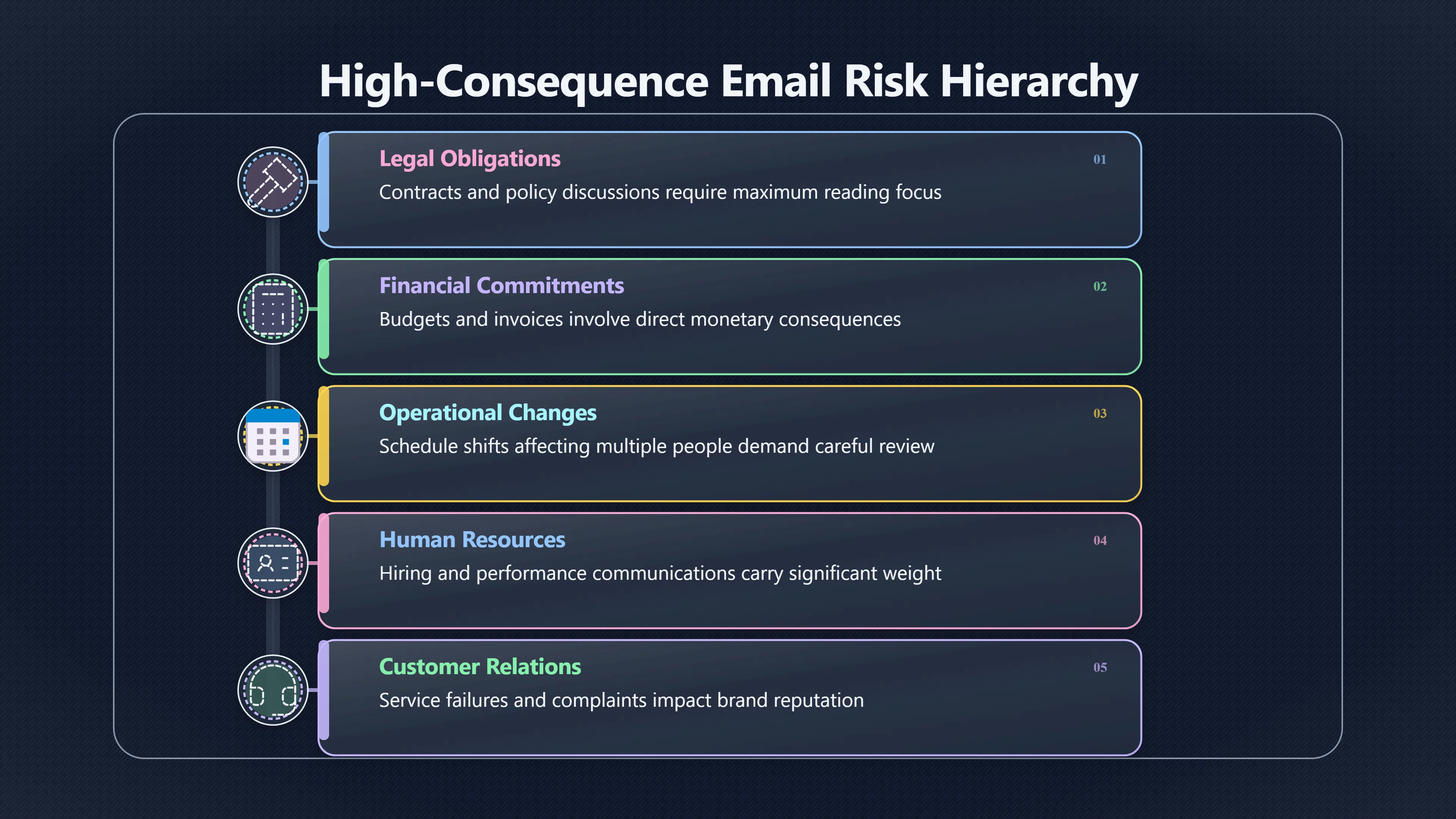
 Most messages can be processed quickly because the consequences of misunderstanding them are low. A status update, newsletter, routine notification, or casual coordination email rarely creates a meaningful obligation. Other messages are different. They create commitments, transfer responsibility, affect money, change schedules, carry legal implications, or influence important relationships. Those emails deserve a deliberate, slower reading pace because the cost of missing a detail is far higher than the time saved by rushing. Email-triage research consistently frames the challenge as prioritising limited attention, while studies of workplace email overload show that volume increases stress and makes important messages easier to overlook.[Ayari+2PMC]ayari.ioWhat is Email Triage?A Practical Guide to Taking Control of…January 12, 2026 — 12 Jan 2026 — Email triage is the practice of rapidly sorting and prioritizi…
The key to reading email faster overall is not accelerating every message. It is identifying the small percentage that are too risky to skim.
The One-Day Ignore Test
A practical way to decide whether an email deserves a slow read is to ask a simple question:
What happens if I ignore this message for one working day?
If the answer is “probably nothing”, a quick scan is usually enough. If the answer involves a missed deadline, delayed payment, damaged relationship, project setback, compliance problem, or lost opportunity, the email moves into the slow-read category.
This test works because it focuses on consequences rather than appearance. Many emails look urgent but have little impact. Others appear routine yet contain commitments hidden inside a paragraph or attachment.
Emails that often fail the one-day ignore test include:
- Requests for approval or sign-off.
- Contract, legal, or policy discussions.
- Budget, invoice, payment, or procurement matters.
- Customer complaints or service failures.
- Schedule changes affecting multiple people.
- Hiring, performance, or HR-related communication.
- Messages documenting agreements or decisions.
- Emails that assign ownership of a task.
The principle is simple: the greater the downside of misunderstanding the message, the slower the reading speed should become.
Risk Signals in Sender and Subject Lines
Before opening an email, several signals can indicate that careful reading will be necessary.
High-consequence senders
The sender often predicts the level of risk more accurately than the subject line.[mailmend.io]mailmend.iosubject line effectiveness statistics29 Subject Line Effectiveness Statistics Every E-commerce…7 Jan 2026 — Data-driven insights revealing how subject line optimization an…
Messages from direct managers, senior leaders, clients, regulators, legal teams, finance departments, HR representatives, suppliers, or key project stakeholders frequently contain obligations rather than information. Research on email deferral behaviour has found that sender importance is one factor influencing whether users postpone handling a message, reflecting the greater effort and attention such emails often require.[arXiv]arxiv.orgarXiv Characterizing and Predicting Email Deferral BehaviorCharacterizing and Predicting Email Deferral BehaviorJanuary 14, 2019…
A message from a close colleague saying “Can you review this?” may be handled differently from an identical request arriving from a client awaiting a decision.
Subject lines that signal commitment
Subject lines frequently reveal whether an email contains a task rather than a simple update.
Examples include:
- Approval required
- Contract review
- Action required
- Response needed
- Budget approval
- Invoice attached
- Deadline approaching
- Meeting change
- Escalation
- Compliance review
Guidance on effective action-oriented subject lines consistently emphasises explicit requests and deadlines because they communicate that a concrete action is expected from the recipient.[Sequenzy]sequenzy.comWhen the recipient needs to complete a specific task by a specific time. · Deadline and Expiration Subject Lines.Read more…
When a subject line contains both an action and a time constraint, it is usually worth slowing down immediately rather than relying on a quick skim.
Turning Routine Scans into Slow Reads
Many important emails do not look important at first. The ability to recognise when a routine scan should become a careful read is one of the most valuable inbox skills.
Several triggers should cause an immediate shift in reading mode.

Hidden deadlines
A message may begin as a status update but later include a phrase such as:
- “Please respond by Thursday.”
- “We need confirmation before the meeting.”
- “This expires at the end of the month.”
Deadlines transform information into obligations. Once a deadline appears, the message deserves a slower pass to ensure no requirement is missed.
Requests disguised as context
Many people explain the background first and place the actual request at the end.
A five-paragraph email might seem informational until the final sentence asks for approval, feedback, or a decision. Slow reading becomes necessary whenever the email’s purpose is unclear after the first scan.
Attachments that contain the real work
The email body is often only an introduction.
Contracts, proposals, invoices, spreadsheets, presentations, policy drafts, and project plans frequently contain the details that matter. Research into email handling behaviour shows that emails involving attachment review are among those more likely to be deferred because they require greater cognitive effort and careful reading.[arXiv]arxiv.orgarXiv Characterizing and Predicting Email Deferral BehaviorCharacterizing and Predicting Email Deferral BehaviorJanuary 14, 2019…
An email saying “Please see attached” is not necessarily a quick-read message. The attachment may be the actual commitment.
Decision-making language
Certain phrases should automatically slow the reading process:
- “Please approve”
- “Can you confirm”
- “We need your decision”
- “Please review”
- “Please advise”
- “Do you agree”
- “Please sign”
These phrases indicate that the sender expects judgement, not merely awareness.
Why Slow Reading Can Be Faster Overall
At first glance, reading some emails more slowly appears to conflict with the goal of increasing reading speed.
In practice, the opposite is often true.
Workplace email research shows that overload is partly driven by the need to revisit messages repeatedly. When people skim a commitment-heavy email, miss a requirement, then return later to clarify details, they effectively read the message multiple times.[ResearchGate]researchgate.netResearchGate(PDF) Email overload at work: An analysis of factors…In this paper, we describe a large-scale nationwide organizational su…
A deliberate first read often prevents:
- Follow-up clarification emails.
- Missed deadlines.
- Duplicate work.
- Incorrect assumptions.
- Costly corrections.
- Relationship friction.
Email triage systems are built around exactly this distinction: separate messages that require judgement from those that require only awareness.[Ayari+2Ayari]ayari.ioWhat is Email Triage?A Practical Guide to Taking Control of…January 12, 2026 — 12 Jan 2026 — Email triage is the practice of rapidly sorting and prioritizi…
The fastest readers are therefore selective readers. They move rapidly through low-risk material and intentionally slow down when an email creates commitments that matter.
A Simple Slow-Read Checklist
Before deciding to skim, check for these signals:
- Does this email affect money, contracts, or budgets?
- Does it contain a deadline or date?
- Does it assign responsibility?
- Does it require approval or a decision?
- Does it reference a previous commitment?
- Does it involve an attachment that contains substantive information?
- Would ignoring it for one day create a problem?
If the answer to any of these questions is yes, the email is usually too risky to skim. The few extra minutes spent reading carefully are often what make high-speed inbox processing possible everywhere else.
Amazon book picks
Further Reading
Books and field guides related to Which emails are too risky to skim?. Use these as the next step if you want deeper reading beyond the article.
Getting Things Done
Directly supports identifying high-consequence communications that require deliberate processing.

Essentialism
Supports separating low-impact messages from communications with significant consequences.
The Effective Executive
Emphasizes consequence-based prioritization similar to deciding which emails are too risky to skim.
eBay marketplace picks
Marketplace Samples
Example marketplace items related to this page. Use the search link to explore similar finds on eBay.


Endnotes
1.
Source: ayari.io
Title: What is Email Triage?
Link:https://ayari.io/article/email-triage-guide
Source snippet
A Practical Guide to Taking Control of...January 12, 2026 — 12 Jan 2026 — Email triage is the practice of rapidly sorting and prioritizi...
Published: January 12, 2026
2.
Source: researchgate.net
Link:https://www.researchgate.net/publication/220879068_Email_overload_at_work_An_analysis_of_factors_associated_with_email_strain
Source snippet
ResearchGate(PDF) Email overload at work: An analysis of factors...In this paper, we describe a large-scale nationwide organizational su...
3.
Source: arxiv.org
Title: arXiv Characterizing and Predicting Email Deferral Behavior
Link:https://arxiv.org/abs/1901.04375
Source snippet
Characterizing and Predicting Email Deferral BehaviorJanuary 14, 2019...
Published: January 14, 2019
4.
Source: sequenzy.com
Link:https://www.sequenzy.com/email-subject-lines/urgent
Source snippet
When the recipient needs to complete a specific task by a specific time. · Deadline and Expiration Subject Lines.Read more...
5.
Source: arxiv.org
Link:https://arxiv.org/abs/1906.03497
6.
Source: ayari.io
Title: email overload
Link:https://ayari.io/article/email-overload
Source snippet
How to Fix It When You Have Too Many Emails (2026) - Ayari7 Feb 2026 — The fix is about processing: You need better triage methods that s...
7.
Source: arxiv.org
Link:https://arxiv.org/abs/1905.01991
Source snippet
A Content-Based Approach to Email Triage Action Predictionby S Mukherjee · 2019 · Cited by 3 — In this work, we study the problem of pred...
8.
Source: researchgate.net
Link:https://www.researchgate.net/publication/347117226_Prioritizing_unread_e-mails_people_send_urgent_responses_before_important_or_short_ones
Source snippet
validating a [measure]({{ 'measure/' | relative_url }}) that will allow the classification of email employees send...Read more...
9.
Source: ciphr.com
Title: email overload
Link:https://www.ciphr.com/blog/email-overload
Source snippet
How to manage email overload at work6 Aug 2019 — Here are four strategies that might help you to reduce this burden, improve productivity...
10.
Source: sublime.security
Title: email triage
Link:https://sublime.security/articles/email-triage/
Source snippet
What It Is, Strategies, and Methods for Security5 Dec 2025 — Email triage is the process of reviewing, classifying, and responding to use...
11.
Source: mailmend.io
Title: subject line effectiveness statistics
Link:https://mailmend.io/blogs/subject-line-effectiveness-statistics
Source snippet
29 Subject Line Effectiveness Statistics Every E-commerce...7 Jan 2026 — Data-driven insights revealing how subject line optimization an...
Additional References
12.
Source: linkedin.com
Link:https://www.linkedin.com/top-content/productivity/managing-email-overload-at-work/email-overload-in-core-business-hours/
Source snippet
Email overload in core business hoursManaging this overload means creating systems and habits that help prioritize, organize, and limit e...
13.
Source: linkedin.com
Link:https://www.linkedin.com/top-content/productivity/managing-email-overload-at-work/strategies-for-email-triage/
Source snippet
Strategies for Email TriageStrategies for email triage help you sort, prioritize, and manage your inbox so you can quickly focus on the m...
14.
Source: mymobilelyfe.com
Title: mastering email overload with ai powered triage and automated responses
Link:https://www.mymobilelyfe.com/artificial-intelligence/mastering-email-overload-with-ai-powered-triage-and-automated-responses/
Source snippet
Mastering Email Overload with AI-Powered Triage and...7 Aug 2025 — Artificial intelligence has evolved to perform rapid subject-line ana...
15.
Source: pmc.ncbi.nlm.nih.gov
Title: PMCinvestigating email classes and work stressors as
Link:https://pmc.ncbi.nlm.nih.gov/articles/PMC11484023/
Source snippet
by M Kern · 2024 · Cited by 9 — High email load has been associated with impaired well-being because emails impose specific demands, d...
16.
Source: victoriagrantva.co.uk
Link:https://victoriagrantva.co.uk/the-coachs-ultimate-guide-to-email-triage-beyond-inbox-zero/
Source snippet
Define Your Email Categories (The 4 D's with a Twist). Before you even open your inbox, know what action each email category requires...
17.
Source: leavemealone.com
Title: the pyschology of email overload how stay sane in 2024
Link:https://leavemealone.com/blog/the-pyschology-of-email-overload-how-stay-sane-in-2024/
Source snippet
The Psychology of Email Overload: How to Stay Sane in 20262 Dec 2025 — The first thing to do if you're experiencing email overload is to...
18.
Source: aimaker.substack.com
Title: build ai email triage agent automation make tutorial
Link:https://aimaker.substack.com/p/build-ai-email-triage-agent-automation-make-tutorial
Source snippet
Triage AI Agent: How I Automated Inbox Zero Without...Build an AI email triage agent that automatically labels, drafts replies, and send...
19.
Source: ecisolutions.com
Title: email overload heres how to effectively manage it
Link:https://www.ecisolutions.com/en-gb/blog/email-overload-heres-how-to-effectively-manage-it/
Source snippet
7 Smart Strategies to Manage Email Overload at Work4 Apr 2022 — Tackle email overload with 7 proven strategies to reduce stress, boost pr...
20.
Source: reddit.com
Link:https://www.reddit.com/r/managers/comments/1ifqmsa/how_do_you_handle_overwhelming_work_volume_emails/
Source snippet
ntly feel buried under the sheer volume of emails, Slack/Teams messages...
21.
Source: youtube.com
Title: Dealing With Emails: Manage Email Overload Using The Four D’s
Link:https://www.youtube.com/watch?v=DLBSsHzgwD0
Source snippet
Three Strategies That Will Revolutionize The Way You Manage Email provides practical framework criteria for distinguishing routine notifi...
Topic Tree