Within Tech docs
Why Skimming Instructions Goes Wrong
Task pages need a slower second pass because commands, paths, warnings, and verification steps often depend on exact order.
On this page
- The hidden cost of missing one step
- The two pass method for procedures
- Where to slow down during execution
Page outline Jump by section
Introduction
Increasing reading speed does not mean reading every kind of documentation faster. Task documentation is the main exception. Installation guides, configuration procedures, deployment instructions, migration checklists, and recovery runbooks are written to help a reader achieve a specific outcome safely. In these documents, speed often conflicts with accuracy because the meaning of one step frequently depends on information introduced earlier or verification required later. Documentation frameworks such as Diátaxis deliberately separate task-oriented material from explanation and reference content because readers have fundamentally different needs when carrying out procedures.[Diátaxis]diataxis.frOpen source on diataxis.fr.
 For readers trying to improve their efficiency, the key insight is that task pages punish rushed reading more severely than most other technical content. A missed warning, skipped prerequisite, or overlooked verification step can force a complete restart, create configuration errors, or introduce difficult-to-diagnose problems. The fastest way through a procedure is often a brief slow pass before execution.
The Hidden Cost of Missing One Step
Task documentation is usually designed as a sequence rather than a collection of independent facts. Each action creates conditions required for later actions. Unlike concept pages, where missing a minor detail rarely destroys overall understanding, procedural pages often contain dependencies that only become visible after an error occurs.[Diátaxis]diataxis.frOpen source on diataxis.fr.
Consider a typical software installation guide:
- Verify system requirements.
- Create a service account.
- Install dependencies.
- Run the installer.
- Configure permissions.
- Validate the installation.
A reader who skims directly to the installer command may complete step four successfully yet encounter failures later because permissions or prerequisites were never established. The apparent time saved by reading quickly is often lost during troubleshooting.
This pattern appears repeatedly in technical operations because procedures are designed around outcomes, not reading convenience. A warning placed near the beginning of a document may explain a constraint that affects every later action. Missing that warning can invalidate the entire workflow.
The same principle applies to paths, filenames, environment variables, configuration values, and command options. Technical documents frequently assume exact execution. A single omitted character or command modifier can produce a different result from the one intended by the author.
Why Task Pages Demand Different Reading Behaviour
Documentation frameworks distinguish how-to and task-oriented material from explanatory content because readers are not trying to learn ideas; they are trying to accomplish work.[Diátaxis]diataxis.frOpen source on diataxis.fr.
That distinction changes how the text should be read.
When reading explanatory material, readers can often skim headings, diagrams, and summaries to build a mental model. If they miss a supporting example, comprehension usually survives.
Procedural content behaves differently because:
- Actions must often occur in a specific order.
- Prerequisites may appear before the first visible step.
- Warnings can alter later decisions.
- Verification checks determine whether it is safe to continue.
- Recovery instructions may only matter if something fails.
In effect, procedural documentation contains hidden branching logic. The page may look linear, but successful execution depends on recognising conditions, exceptions, and checkpoints embedded throughout the instructions.
User-experience research consistently shows that task wording influences behaviour and performance. Even small misunderstandings in instructions can change how people perform a task.[Nielsen Norman Group]nngroup.comusability testing 101Small errors in the phrasing of a task can cause the participant to misunderstand what they…Read more…
The Two-Pass Method for Procedures
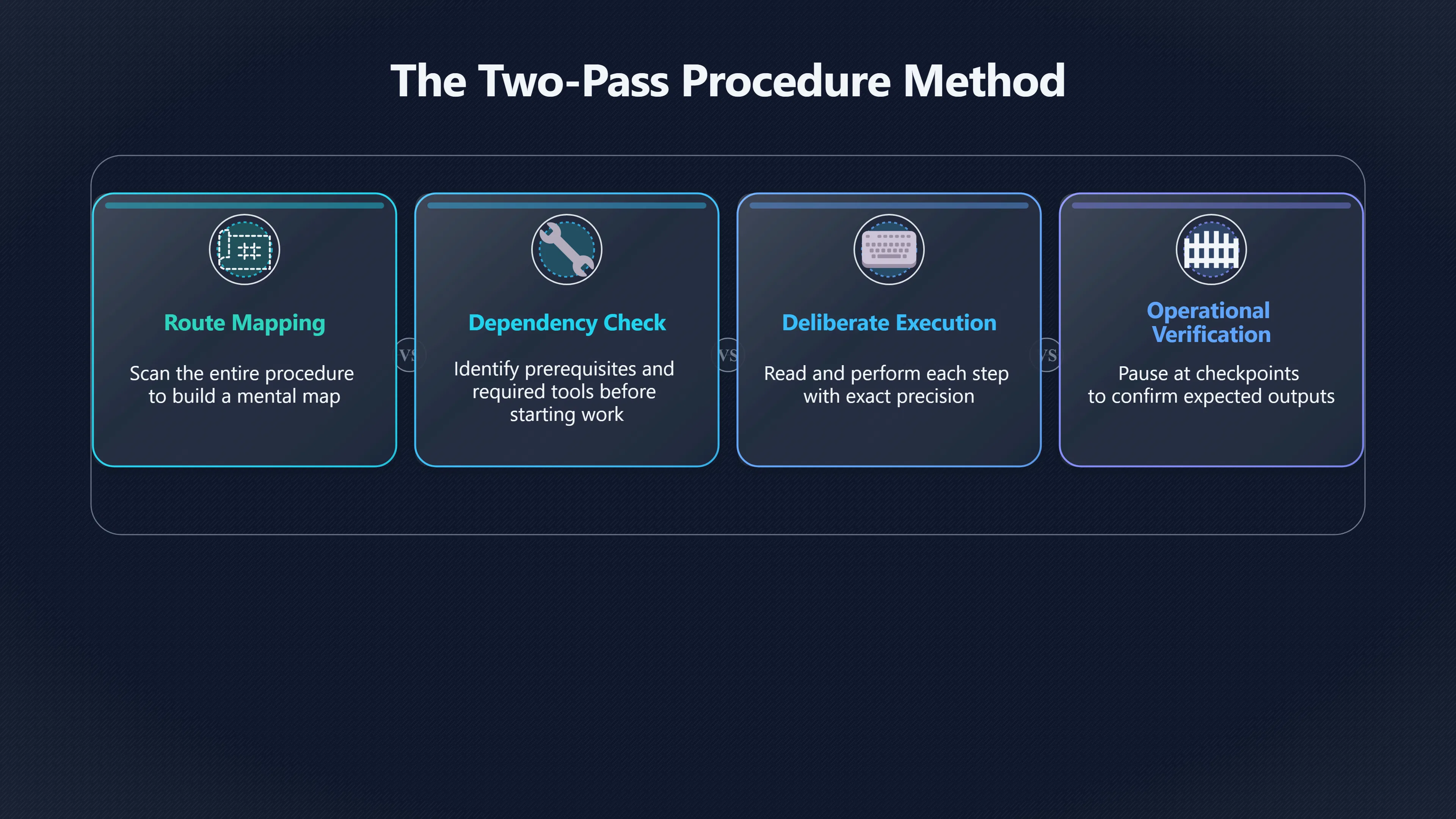
Readers who want both speed and accuracy often benefit from a two-pass approach.
First Pass: Build the Route
Before typing commands or changing settings, scan the entire procedure.
Focus on:
- Prerequisites.
- Required tools or permissions.
- Warnings and cautions.
- Estimated sequence length.
- Verification checkpoints.
- Rollback or recovery instructions.
The goal is not memorisation. The goal is creating a mental map of the procedure before execution begins.
This pass often takes only a minute or two but reveals dependencies that would otherwise be discovered through failure.

Second Pass: Execute Deliberately
During execution, slow down and read step by step.
At this stage:
- Compare commands exactly.
- Verify paths and filenames.
- Check parameters before running them.
- Confirm expected outputs.
- Pause at validation checkpoints.
The second pass is not ordinary reading. It is operational verification.
This approach aligns with how task-oriented documentation is intended to be used: first understanding the process, then carrying it out. Documentation frameworks that separate how-to guides from explanatory content reflect this practical distinction between orientation and execution.[Diátaxis]diataxis.frOpen source on diataxis.fr.
Where to Slow Down During Execution
Not every sentence in a procedure deserves equal attention. Readers seeking efficiency should identify the sections where mistakes are most expensive.
Prerequisites
Many failures begin before the first numbered step.
Required software versions, access rights, operating-system assumptions, or hardware requirements are often listed at the start because everything that follows depends on them. Skipping these sections is one of the most common causes of avoidable troubleshooting.
Warnings and Notes
Warnings are usually included because previous users encountered predictable problems.
A reader moving quickly may treat warning boxes as optional commentary. In practice, they often contain information that changes how later steps should be performed.
Commands and Configuration Values
This is where precision matters most.
Slow down when reading:
- Command-line options.
- File paths.
- Configuration keys.
- Usernames and service accounts.
- Environment variables.
- Port numbers and addresses.
These details frequently differ by only a few characters, making them particularly vulnerable to rushed reading.
Verification Steps
Verification steps are often the first thing impatient readers skip.
That is a mistake because validation points exist to detect problems early, when correction is cheapest. Continuing without confirming expected results can allow a small error to spread through the rest of the procedure.
Verification checkpoints function like quality-control gates. They answer a simple question: “Is it safe to continue?”
If the answer is unknown, proceeding faster rarely saves time.
Accuracy Is Often the Faster Strategy
Readers interested in increasing reading speed sometimes assume that every document should be consumed more rapidly. Task documentation demonstrates why that assumption fails.
Procedural pages are not primarily information resources; they are execution tools. Their value comes from producing a correct outcome. Because commands, warnings, dependencies, and verification checks frequently rely on exact sequence and interpretation, a rushed read can create delays far greater than the time saved.
For task documentation, the most efficient reader is rarely the fastest scanner. It is the reader who slows down at the points where accuracy determines whether the procedure succeeds on the first attempt.
Amazon book picks
Further Reading
Books and field guides related to Why Skimming Instructions Goes Wrong. Use these as the next step if you want deeper reading beyond the article.
The Checklist Manifesto
Explains why following procedures carefully prevents costly mistakes.

Turn the Ship Around!: A True Story of Turning Followers into...
Highlights disciplined execution of operational processes.

The Practice of System and Network Administration: Volume 1:...
Emphasizes procedural accuracy and execution.
eBay marketplace picks
Marketplace Samples
Example marketplace items related to this page. Use the search link to explore similar finds on eBay.

Endnotes
1.
Source: diataxis.fr
Link:https://diataxis.fr/
2.
Source: discuss.ocaml.org
Title: “Diátaxis” documentation structure
Link:https://discuss.ocaml.org/t/diataxis-documentation-structure/7750
Source snippet
ocaml.org"Diátaxis" documentation structure - Community27 Apr 2021 — It encourages authors to structure documentations in four categories...
3.
Source: nngroup.com
Title: usability testing 101
Link:https://www.nngroup.com/articles/usability-testing-101/
Source snippet
Small errors in the phrasing of a task can cause the participant to misunderstand what they...Read more...
4.
Source: nngroup.com
Title: U X Writing: Study Guide
Link:https://www.nngroup.com/articles/ux-writing-study-guide/
Source snippet
UX Writing: Study GuideMay 8, 2024 — UX writing is the practice of writing carefully considered information that addresses people's conte...
Published: May 8, 2024
5.
Source: nngroup.com
Title: Lean UX Documentation for Tracking and Communicating
Link:https://www.nngroup.com/articles/lean-agile-documentation/
Source snippet
May 2, 2021 — This article discusses how to document and communicate the right types of UX details throughout the Agile product-developme...
Published: May 2, 2021
6.
Source: nngroup.com
Title: help and documentation
Link:https://www.nngroup.com/articles/help-and-documentation/
Source snippet
(Usability Heuristic #10)Dec 13, 2020 — Proactive help is intended to get users familiar with an interface while reactive help is meant f...
7.
Source: nngroup.com
Link:https://www.nngroup.com/videos/document-ux-methods/
Source snippet
d can be used to educate other team members on UX activities...
8.
Source: nngroup.com
Title: Research Plans: Organize, Document, Inform
Link:https://www.nngroup.com/articles/pm-research-plan/
Source snippet
NN/GNov 1, 2024 — A research plan is a document that outlines the goals, methods, and logistical details of a research study.Read more...
9.
Source: nngroup.com
Title: applying writing guidelines web pages
Link:https://www.nngroup.com/articles/applying-writing-guidelines-web-pages/
Source snippet
Applying Writing Guidelines to Web PagesJan 6, 1998 — Summary: Web users generally prefer writing that is concise, easy to scan, and obje...
10.
Source: nngroup.com
Title: ux documentation agile
Link:https://www.nngroup.com/videos/ux-documentation-agile/
Source snippet
UX Documentation in Agile (Video)Jan 28, 2022 — Documenting UX processes and design decisions are organizational memory, so even Agile pr...
11.
Source: diataxis.fr
Link:https://diataxis.fr/reference/
Source snippet
ReferenceAlthough reference should not attempt to show how to perform tasks, it can and often needs to include a description of how somet...
Additional References
12.
Source: medium.com
Link:https://medium.com/design-bootcamp/14-golden-rules-of-ux-writing-946d37706334
Source snippet
14 golden rules of UX writingUX writing isn't just about writing content. It's about designing content. Writing is just as important to U...
13.
Source: researchgate.net
Link:https://www.researchgate.net/publication/397060413_Evaluation_and_verification_of_requirements_artifacts_A_Checklist_applied_to_User_Stories_and_Prototype
Source snippet
A Checklist applied to User Stories and Prototype30 Oct 2025 — To support this verification process and ensure the completeness of artifa...
14.
Source: toptal.com
Link:https://www.toptal.com/designers/ux/how-to-conduct-usability-testing-in-6-steps
Source snippet
How to Conduct Usability Testing in Six StepsThe Six Basic Elements of User Testing · Create a prototype · Come up with a test plan · Rec...
15.
Source: linkedin.com
Link:https://www.linkedin.com/posts/nielsen-norman-group_4-principles-to-help-reduce-cognitive-load-activity-7366501548786470914-fXXm
Source snippet
How to Design User-Friendly Forms: 4 Key PrinciplesA simple solution is to tell the user upfront of the documents that are needed and com...
16.
Source: lyssna.com
Link:https://www.lyssna.com/guides/usability-testing-guide/usability-test-plan/
Source snippet
Usability test planLearn how to create a usability test plan with clear goals, tasks, and metrics. Get a sample template and checklist to...
17.
Source: youtu.be
Link:https://youtu.be/ECXtMPx-4uQ
Source snippet
"Docs Community: [https://github.com/python/docs-community](https://github.com/python/docs-community) Our Discourse forum: [https://discuss.python.org/c/documentation/26..."](https://discuss.python.org/c/documentation/26...")...
18.
Source: ijtc.net
Title: writing for humans and machines a guide to search friendly technical writing
Link:https://www.ijtc.net/writing-for-humans-and-machines-a-guide-to-search-friendly-technical-writing/
Source snippet
Writing for humans and machines: A guide to search-friendly...Dec 17, 2025 — This aligns with research from Nielsen Norman Group showing...
19.
Source: idratherbewriting.com
Title: what is diataxis documentation framework
Link:https://idratherbewriting.com/blog/what-is-diataxis-documentation-framework
Source snippet
I'd Rather Be WritingWhat is Diátaxis and should you be using it with your...18 Oct 2023 — The Diátaxis approach to documentation organi...
20.
Source: emmanuelbernard.com
Title: Emmanuel Bernard Exploring Diataxis
Link:https://emmanuelbernard.com/blog/2024/12/19/diataxis/
Source snippet
Exploring Diataxis - on structuring documentation19 Dec 2024 — Diataxis categorizes documentation into four distinct types of documents...
21.
Source: uxtigers.com
Link:https://www.uxtigers.com/post/user-testing
Source snippet
12 Steps for Usability Testing: Plan, Run, Analyze, Report4 Sept 2025 — Usability testing is straightforward: give people realistic tasks...
Topic Tree